
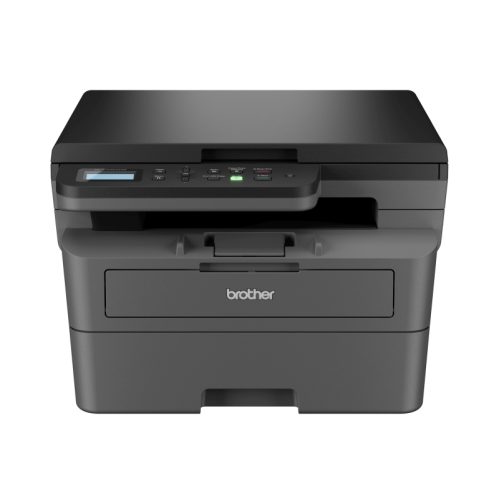
Brother HL-L2464DW Compact 3-in-1 Mono Laser Printer — Built for Australian Home Offices and Small Businesses
The Brother HL-L2464DW is a compact, wireless monochrome laser multifunction printer that delivers fast, reliable print, copy and scan functionality from a single space-saving device. Designed for home offices, students and small businesses across Australia, the HL-L2464DW combines 28ppm laser print speed, dual-band Wi-Fi, automatic duplex printing and high-yield toner compatibility into one competitively priced package.
Unlike inkjet printers that dry out between uses and produce inconsistent results, the HL-L2464DW uses laser toner technology that delivers sharp, professional-quality monochrome output every single time — from the first page to the last. For anyone who prints regularly, a monochrome laser printer like the Brother HL-L2464DW delivers a lower cost per page and greater reliability than any inkjet alternative in its class.
Key Features of the Brother HL-L2464DW
Print, Copy and Scan — A True 3-in-1 Multifunction Printer
The Brother HL-L2464DW is not just a printer. The 3-in-1 designation means this single device handles three essential office functions: printing, photocopying and flatbed scanning. For home offices and small workspaces where desk space is limited and budget matters, replacing three separate devices with one compact multifunction unit is both practical and economical. The HL-L2464DW fits comfortably on a desk or shelf while delivering the full functionality of a professional office setup.
Fast 28 Pages Per Minute Laser Print Speed
At up to 28 pages per minute, the Brother HL-L2464DW handles large print jobs without the delays that frustrate users of slower inkjet or entry-level laser printers. Whether you are printing a 50-page report, a stack of invoices or a full assignment, the HL-L2464DW gets through the job quickly and consistently. The first page output time is also fast, meaning you do not wait long for single-page print jobs either — the printer wakes from sleep and prints promptly when you need it.
Automatic Two-Sided Duplex Printing
Automatic duplex printing is one of the most practical features of the HL-L2464DW for everyday office and home use. The printer feeds paper through automatically to print both sides of each sheet without any manual intervention — no turning pages over, no refilling the tray halfway through a job. For businesses that regularly print double-sided documents, duplex printing cuts paper consumption in half and noticeably reduces printing costs over time. For environmental-conscious households and businesses, it is also a straightforward way to reduce paper waste.
Dual-Band 2.4GHz and 5GHz Wi-Fi Connectivity
The Brother HL-L2464DW connects to your home or office network via dual-band Wi-Fi, supporting both 2.4GHz and 5GHz wireless frequencies. This means the printer works with virtually any modern router and benefits from the faster, less congested 5GHz band for more reliable wireless printing in busy Wi-Fi environments. Once connected to your network, any computer, laptop, phone or tablet on the same network can send print jobs to the HL-L2464DW without any physical cable connection. USB connectivity is also available for direct wired connection to a single computer.
Print from Your Smartphone or Tablet
The Brother HL-L2464DW supports mobile printing via the Brother iPrint and Scan app, available for both iOS and Android devices. Open a document, photo or file on your phone, select the printer, and print — no computer required. The printer also supports industry-standard wireless printing protocols, making it compatible with Apple AirPrint for iPhone and iPad users and Mopria for Android users. For students, remote workers and anyone who primarily works from a mobile device, this capability is genuinely useful in daily use.
250-Sheet Paper Tray Plus Manual Feed Slot
The 250-sheet paper capacity tray means less frequent paper reloading during large print jobs — a practical advantage for busy home offices and small businesses that print regularly. The additional manual feed slot allows you to quickly load a single sheet of a different paper type — an envelope, a label sheet, a heavier cardstock — without emptying or reconfiguring the main tray. This combination of main tray and manual feed gives the HL-L2464DW practical flexibility for varied print tasks.
High-Yield Toner for Lower Running Costs
One of the most important long-term considerations when choosing a laser printer is the cost per page. The Brother HL-L2464DW comes with a starter toner cartridge that prints up to 700 pages — enough to get started immediately out of the box. When the starter toner runs out, high-yield replacement toners are available that deliver up to 3,000 pages per cartridge. At that yield level, the cost per page from a high-yield toner is significantly lower than comparable inkjet printers and even lower than standard-yield laser toner cartridges. For businesses and frequent home users, this translates to meaningful savings on printing costs over the life of the printer.
Latest Industry-Standard Security Features
The Brother HL-L2464DW includes built-in network security features designed to meet current industry standards, protecting your printer from unauthorised access on your network. For small businesses handling sensitive documents — financial records, client information, legal paperwork — this level of built-in printer security is increasingly important as home and office networks become targets for cyber threats.
128MB Internal Memory
The 128MB internal memory allows the HL-L2464DW to receive and process multiple print jobs in its queue without slowing down or requiring the sending computer to stay connected throughout the entire job. For small office environments where multiple users share a single network printer, adequate internal memory makes shared printing more reliable and less frustrating.
Specifications
Brand: Brother
Model: HL-L2464DW
SKU: HL-L2464DW
Printer Type: Compact Monochrome Laser Multifunction (Print, Copy, Scan)
Print Speed: Up to 28 pages per minute
Print Resolution: Up to 1200 x 1200 dpi
Duplex Printing: Automatic two-sided (duplex)
Paper Capacity: 250-sheet input tray plus manual feed slot
Connectivity: 2.4GHz and 5GHz dual-band Wi-Fi, USB
Mobile Printing: Brother iPrint and Scan app (iOS and Android), AirPrint, Mopria
Internal Memory: 128MB
In-Box Toner Yield: Up to 700 pages
High-Yield Toner: Up to 3,000 pages per replacement cartridge
Printer Functions: Print, Copy, Scan (3-in-1)
Colour: Monochrome (black and white) only
Suitable For: Home office, small business, students
Is the Brother HL-L2464DW Right for You?
Home Office Workers and Remote Staff: The HL-L2464DW is one of the most practical home office laser printers available in Australia. It is compact enough to sit comfortably on a desk, fast enough to handle daily business printing without frustration, and versatile enough to handle scanning and copying when needed. Wi-Fi connectivity means it connects to your existing home network without any additional hardware.
Students: University and secondary school students who print assignments, readings and study notes regularly will find the HL-L2464DW a cost-effective long-term investment. The high-yield toner option significantly reduces the per-page cost compared to inkjet alternatives, and the compact size fits student desks and rental accommodation without taking over the room.
Small Businesses: Sole traders, consultants, medical practices, legal offices and any small business that regularly prints invoices, contracts, reports or client documents will benefit from the HL-L2464DW’s combination of speed, duplex printing and high-yield toner economy. The Wi-Fi connectivity allows multiple staff to share the printer from their individual workstations without any physical cabling.
Businesses Replacing an Inkjet Printer: If you are currently using an inkjet printer and finding it slow, unreliable or expensive to run due to ink costs, the Brother HL-L2464DW is a straightforward upgrade. Laser printing delivers more consistent results, lower long-term consumable costs and greater reliability than inkjet printing for document and text output.
What’s in the Box
The Brother HL-L2464DW package includes the printer unit, a starter toner cartridge (up to 700 pages), a power cable and setup documentation. A product brochure with full specifications is available to download as a PDF from the OnlyPOS product page. For replacement toner cartridges and accessories, contact the OnlyPOS team at 1300 183 340.
Wi-Fi Setup Overview
Step 1: Unbox the printer, install the toner cartridge and load paper into the 250-sheet tray.
Step 2: Power on the printer and use the control panel to navigate to the wireless setup menu. Select your Wi-Fi network and enter your Wi-Fi password.
Step 3: Download and install the Brother printer driver on your computer from the Brother Australia support website, or use the included setup disc if available.
Step 4: For mobile printing, download the Brother iPrint and Scan app from the App Store (iOS) or Google Play (Android) and follow the in-app setup to detect and connect to your printer.
Step 5: Print a test page to confirm the connection and print quality before starting regular use.
Brother Australia Warranty and OnlyPOS Support
The Brother HL-L2464DW is backed by Brother Australia’s manufacturer warranty, providing coverage for defects in materials and workmanship under normal use conditions. OnlyPOS provides local Australian customer support for all Brother printer products. If you have questions about setup, Wi-Fi configuration, toner compatibility or warranty claims, contact our team at 1300 183 340 or email sales@onlypos.com.au.
Volume and Business Pricing
Equipping a team, fitting out a new office or purchasing multiple printers for a business or educational institution? OnlyPOS offers volume pricing on Brother laser printer orders. Call 1300 183 340 to speak with our business hardware team about pricing, delivery and support options for multi-unit purchases.
Frequently Asked Questions
Does the Brother HL-L2464DW print in colour?
No. The Brother HL-L2464DW is a monochrome laser printer — it prints in black and white only. It does not support colour printing. For high-quality, fast monochrome document printing this is not a limitation — laser monochrome output is sharp, professional and extremely cost-effective per page. If you require colour printing, Brother offers a separate range of colour laser multifunction printers.
Does the Brother HL-L2464DW have automatic duplex printing?
Yes. The HL-L2464DW features automatic two-sided duplex printing. The printer automatically feeds paper through to print both sides without any manual page turning or re-feeding required. Simply select duplex in your print settings and the printer handles the rest.
How do I connect the Brother HL-L2464DW to Wi-Fi?
Power on the printer and use the control panel to access the wireless setup menu. Select your Wi-Fi network name (SSID), enter your Wi-Fi password and confirm. The printer will connect to your network and display a confirmation. You can then install the Brother printer driver on your computer and add the printer via the network. The Brother iPrint and Scan app on your smartphone will also detect the printer automatically once it is connected to the same Wi-Fi network.
What toner does the Brother HL-L2464DW use?
The Brother HL-L2464DW uses Brother TN2460 standard-yield toner and Brother TN2465 high-yield toner cartridges. The high-yield TN2465 delivers up to 3,000 pages per cartridge, making it the more cost-effective choice for regular users. Contact the OnlyPOS team at 1300 183 340 for toner availability and pricing.
How many pages does the starter toner last?
The in-box starter toner cartridge supplied with the Brother HL-L2464DW delivers up to 700 pages. When the starter toner runs out, replacing it with a high-yield TN2465 cartridge gives you up to 3,000 pages — a significantly lower cost per page for regular users.
Can I print from my iPhone or Android phone with the Brother HL-L2464DW?
Yes. The Brother HL-L2464DW supports mobile printing via the Brother iPrint and Scan app for both iOS and Android. iPhone and iPad users can also print using Apple AirPrint without installing any additional app. Android users can use Mopria-compatible apps in addition to the Brother iPrint and Scan app.
What is the print resolution of the Brother HL-L2464DW?
The Brother HL-L2464DW prints at up to 1200 x 1200 dpi resolution, delivering sharp, professional-quality monochrome text and graphics output suitable for business documents, reports, invoices and study materials.
What is the difference between the Brother HL-L2464DW and HL-L2445DW?
The Brother HL-L2445DW is a print-only model, meaning it does not have copy or scan functionality. The HL-L2464DW is a 3-in-1 multifunction model that includes print, copy and flatbed scan capability. If you need a printer that also scans documents and makes photocopies, the HL-L2464DW is the more practical and complete choice. Both models share the same print engine, speed and Wi-Fi connectivity.
Is the Brother HL-L2464DW good for a home office?
Yes. The HL-L2464DW is one of the most well-rounded compact laser printers available for home office use in Australia. It is compact, fast, supports wireless printing from any device, includes automatic duplex for paper savings, and offers low running costs with high-yield toner. The scan and copy functionality eliminates the need for a separate scanner or photocopier in a home office setup.
Does the Brother HL-L2464DW work with Mac and Windows?
Yes. The Brother HL-L2464DW is compatible with both macOS and Windows operating systems. Brother provides drivers for both platforms available for download from the Brother Australia support website. Mobile printing is supported on iOS and Android devices via the Brother iPrint and Scan app, AirPrint and Mopria.
Reviews
There are no reviews yet.