Why Australian Businesses Choose the Sewoo SLK-TS400 Receipt Printer
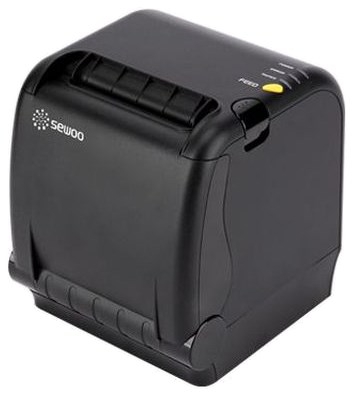
The Sewoo SLK-TS400 USB/Serial Receipt Printer is a compact, commercial-grade thermal receipt printer purpose-built for Australian retail stores, cafés, restaurants, hospitality venues and service counters where counter space is at a premium. With a revolutionary front-opening paper lid, a 40% smaller footprint than its predecessors, and fast 220mm/sec direct thermal printing, the SLK-TS400 delivers serious performance in a fraction of the space.
Unlike conventional top-loading receipt printers that require clearance above the unit for the lid to open, the SLK-TS400’s front-opening design means it can be installed in confined under-counter spaces, tight shelving setups and crowded checkout environments where standard printers simply won’t fit. It is the kind of thoughtful engineering that solves a real problem for busy Australian businesses.
Key Features of the Sewoo SLK-TS400 Receipt Printer
Revolutionary Front-Opening Paper Loading
The SLK-TS400’s standout design innovation is its front-opening paper lid. Rather than swinging upward like a traditional receipt printer, the paper compartment opens from the front of the unit. This single design change eliminates the vertical clearance requirement above the printer, allowing the SLK-TS400 to be installed in spaces where no other printer would fit — beneath a countertop, inside a shelving unit or in any other vertically constrained environment. Paper changes are quick, straightforward and do not require moving the printer out of its installation position.
40% Smaller Footprint — Maximum Counter Space
The SLK-TS400 achieves a 40% reduction in footprint compared to its predecessor models without any compromise in performance, speed or reliability. For Australian retailers, cafés and hospitality businesses where every square centimetre of counter space matters, this is a meaningful advantage. A smaller printer means more room for customer-facing displays, payment terminals, condiments or simply a cleaner, less cluttered checkout experience.
Fast 220mm/sec Direct Thermal Printing
The SLK-TS400 prints at speeds of up to 220mm per second at 180 DPI resolution — fast enough to handle high-volume receipt printing during your busiest trading periods without creating bottlenecks at the checkout. Direct thermal printing means no ink cartridges, no toner and no ribbon replacements. The only consumable you ever need to replace is the 80mm thermal paper roll, keeping your running costs low and your operations simple.
USB and Serial Interfaces — Broad Compatibility
The SLK-TS400 USB/SR model features both USB and Serial (RS-232) connectivity, giving your business the flexibility to connect to modern POS terminals via USB or integrate with legacy POS systems and older hardware via the serial interface. This dual-interface capability makes the SLK-TS400 particularly well suited to businesses upgrading from older systems or running mixed hardware environments where backward compatibility is a requirement.
ESC/POS Epson Emulation — Works With Your Existing POS Software
The Sewoo SLK-TS400 supports ESC/POS command emulation — the same standard used by Epson printers and supported by the vast majority of Australian POS software platforms. This means the SLK-TS400 will work with Square, Lightspeed, MYOB, Kounta, Vend, TouchBistro, Loyverse and most other major platforms without needing custom drivers or complex configuration. If your software already supports an Epson-compatible receipt printer, it will support the SLK-TS400.
Autocutter for Smooth, Professional Receipts
The built-in autocutter cleanly cuts each receipt after printing, delivering a professional result and eliminating the need for staff to manually tear paper. This not only looks more professional but also reduces the time spent at the counter between transactions — every second counts during a busy service period.
Technical Specifications
| Model | Sewoo SLK-TS400 |
|---|---|
| SKU | SLK-TS400US |
| Printer Type | Desktop Receipt Printer |
| Print Method | Direct Thermal (no ink or toner required) |
| Interface | USB + Serial (RS-232) |
| Print Speed | Up to 220mm/sec |
| Print Resolution | 180 DPI |
| Print Width | 80mm |
| Paper Roll Dimensions | 80mm (W) x 0.065mm (T) x 83mm (D) |
| Cutter Type | Auto-Cutter |
| Paper Loading | Front-Opening Lid (unique design) |
| Power Supply | AC 100–240V, 50/60Hz / DC 24V, 1.75A |
| Colour | Black |
| Command Emulation | ESC/POS (Epson Compatible) |
| Footprint Reduction | 40% smaller than predecessor models |
| Solutions For | Retail, Hospitality |
| Brand | Sewoo |
| Warranty | 2 Years |
Ideal For — Who Should Buy the Sewoo SLK-TS400?
The Sewoo SLK-TS400 USB/Serial Receipt Printer is the ideal choice for:
Cafés and Coffee Shops: Where the counter is small, busy and packed with equipment. The SLK-TS400’s compact footprint and front-loading design keep it out of the way without sacrificing speed or reliability during the morning rush.
Retail Stores: USB connectivity makes it simple to connect to any modern retail POS system, while ESC/POS emulation ensures compatibility with all major retail POS software used in Australia.
Restaurants and Bars: Fast 220mm/sec print speed handles high-volume receipt and order printing without slowing down service during peak periods.
Under-Counter and Space-Constrained Installations: The front-opening lid is purpose-designed for environments where there is limited clearance above the printer — shelving units, under-bench installations and integrated counter setups.
Businesses Upgrading from Legacy Systems: The dual USB and Serial interface options allow businesses to connect the SLK-TS400 to both modern and older POS hardware without needing to replace existing equipment.
What’s in the Box
The Sewoo SLK-TS400 USB/SR package includes the printer unit and standard accessories ready for installation. An 80mm thermal paper roll and any required interface cables may be purchased separately. Contact the OnlyPOS team at 1300 183 340 for accessory availability and bundle pricing.
Installation Overview
Step 1 — Position the Printer: Place the SLK-TS400 in your desired location. Because the paper lid opens from the front, you do not need overhead clearance — the printer can be installed under counters or inside shelving units.
Step 2 — Connect Interface Cable: Connect via USB (for modern POS terminals) or Serial RS-232 (for legacy systems). Both connection types are supported natively.
Step 3 — Install Driver (if required): The SLK-TS400 uses ESC/POS emulation, which means most POS software will recognise it automatically as an Epson-compatible printer. Specific Sewoo drivers are available for download if required by your system.
Step 4 — Load Paper: Open the front-facing paper compartment, drop in an 80mm thermal paper roll, close the lid, and you are ready to print.
Step 5 — Configure in POS Software: Select your connected port (USB or COM port for Serial) within your POS software’s printer settings and run a test print to confirm setup.
Warranty and Australian Support
The Sewoo SLK-TS400 comes with a 2-year manufacturer warranty, reflecting Sewoo’s confidence in the commercial durability of this product. OnlyPOS provides local Australian customer support for all Sewoo products sold through our store. For warranty claims, technical support or setup assistance, contact our team at 1300 183 340 or email sales@onlypos.com.au.
Why Buy the Sewoo SLK-TS400 from OnlyPOS?
OnlyPOS is one of Australia’s dedicated POS hardware specialists, supplying businesses across Sydney, Melbourne, Brisbane, Perth, Adelaide and regional Australia. When you purchase the Sewoo SLK-TS400 through OnlyPOS you receive a genuine product backed by manufacturer warranty, access to our local Australian support team by phone and email, fast dispatch from our Australian warehouse, and expert advice on POS software compatibility and installation. For volume pricing on multiple units, call 1300 183 340.
Frequently Asked Questions — Sewoo SLK-TS400
What paper roll does the Sewoo SLK-TS400 use?
The Sewoo SLK-TS400 uses 80mm wide direct thermal paper rolls. The paper dimensions are 80mm (W) x 0.065mm (T) x 83mm (D). No ink, toner or ribbon is required — the thermal print head applies heat directly to the paper. 80mm thermal paper rolls are available separately from OnlyPOS.
How does the front-opening paper lid work on the SLK-TS400?
Instead of opening upward like a traditional receipt printer, the SLK-TS400’s paper compartment opens from the front of the unit. This means the printer requires no vertical clearance above it, making it suitable for under-counter and shelving installations. To load paper, simply press the front release, drop in the roll, and close the cover.
Is the Sewoo SLK-TS400 compatible with Square POS?
The Sewoo SLK-TS400 uses ESC/POS (Epson emulation), which is the command standard supported by most major POS platforms. Compatibility with Square POS depends on the connection type — Square typically supports USB-connected ESC/POS printers. We recommend confirming with the OnlyPOS team at 1300 183 340 before purchase to ensure compatibility with your specific setup.
What interfaces does the Sewoo SLK-TS400 USB/SR support?
The SLK-TS400 USB/SR model supports two interfaces: USB (for modern POS terminals and computers) and Serial RS-232 (for legacy POS systems and older hardware). This dual-interface design makes it suitable for both new installations and businesses upgrading from older equipment.
Does the Sewoo SLK-TS400 require drivers?
Because the SLK-TS400 uses ESC/POS Epson emulation, most POS software will recognise and work with it as an Epson-compatible printer without needing specific Sewoo drivers. However, if your operating system or software requires specific drivers for USB or Serial connectivity, Sewoo drivers are available. Contact OnlyPOS for driver download assistance.
What is the print speed of the Sewoo SLK-TS400?
The Sewoo SLK-TS400 prints at a maximum speed of 220mm per second at 180 DPI resolution. This speed is more than adequate for high-volume receipt printing in busy retail and hospitality environments.
What warranty does the Sewoo SLK-TS400 come with in Australia?
The Sewoo SLK-TS400 comes with a 2-year manufacturer warranty. OnlyPOS provides local Australian support for all warranty claims and technical issues. Contact our team at 1300 183 340 or sales@onlypos.com.au for warranty assistance.
How much smaller is the SLK-TS400 compared to earlier Sewoo printers?
The Sewoo SLK-TS400 achieves a 40% reduction in footprint compared to its predecessor models. This significant size reduction, combined with the front-opening paper lid, makes it one of the most space-efficient 80mm thermal receipt printers available for Australian businesses.
Is the Sewoo SLK-TS400 suitable for hospitality use?
Yes. The SLK-TS400 is designed and rated for both retail and hospitality environments. Its fast 220mm/sec print speed, compact design, autocutter and ESC/POS compatibility make it well suited to cafés, restaurants, bars and food service counters across Australia.
Can the Sewoo SLK-TS400 print barcodes and logos?
Yes. The SLK-TS400 supports barcode and logo printing as part of its thermal receipt output. Using ESC/POS commands, your POS software can send formatted receipts that include your business logo, 1D barcodes and other graphical elements directly printed on each receipt.