

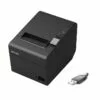
USB Receipt Printers
Showing the single result
-
Know More
Epson TM-M30II USB/Ethernet Compact Receipt Pri...
Call for Price
You save (%)
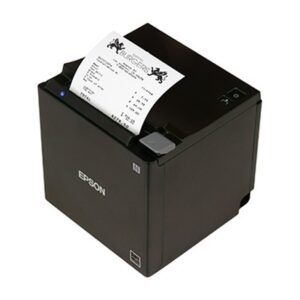
Buy USB Interface Receipt Printers from Top Brands — Epson, Citizen, Star Micronics & More
Shop Australia’s leading range of USB receipt printers at OnlyPOS. Whether you’re running a busy retail store, a café, a restaurant, or any point-of-sale environment, our USB receipt printers deliver fast, reliable, and low-maintenance printing every time.
What Is a USB Receipt Printer?
A USB receipt printer is a compact thermal printer that connects directly to your computer or POS terminal via a standard USB cable. Using heat-sensitive paper rather than ink or toner, these printers produce crisp, clear receipts in seconds – with no cartridges to replace and minimal ongoing maintenance costs.
USB receipt printers are the most straightforward connectivity option for businesses using a fixed POS workstation. Plug in, install the driver, and you’re ready to print – it’s that simple.
Why Choose a USB Receipt Printer?
Simple, Stable Connectivity USB is the most universally supported interface for POS systems. There’s no network configuration needed, no pairing process, and no risk of wireless dropouts during a busy service period. Just a direct, dependable connection between your printer and your POS terminal.
Fast Thermal Printing Our USB receipt printers use direct thermal technology, printing at speeds of up to 250–300mm per second depending on the model. That means shorter queues, faster transactions, and a smoother experience for your customers.
No Ink, No Toner – Lower Running Costs Because thermal printers use heat rather than ink or ribbon, your ongoing consumable cost is just thermal paper rolls. This makes USB receipt printers one of the most cost-effective printing solutions available for small to medium businesses.
Compact Footprint Designed to sit neatly beside a cash register or POS terminal, USB receipt printers are small enough to fit in tight counter spaces without cluttering your workstation.
Compatible with Leading POS Software Our range is compatible with major POS platforms used across Australia, including Square, Shopify POS, Lightspeed, MYOB, and more — on Windows, macOS, and Linux.
Features to Look For
When choosing a USB receipt printer, consider the following:
Print Speed – Look for models printing at 180mm/sec or above for busy retail or hospitality environments.
Paper Width – The two most common sizes are 58mm and 80mm thermal paper rolls. Most commercial settings use 80mm.
Auto-Cutter – An automatic paper cutter saves time and ensures clean, consistent receipt presentation. Most models in our range include this as standard.
Drop-In Paper Loading – Makes changing paper rolls fast and effortless, even during peak trading hours.
Logo & Barcode Printing – Many models support custom logo printing, QR codes, and barcodes – great for loyalty programs, promotional receipts, and order tracking.
Cash Drawer Port – Most USB receipt printers include an RJ11 cash drawer port, allowing you to connect a cash drawer and trigger it to open automatically at the end of each transaction.
Who Uses USB Receipt Printers?
USB receipt printers are ideal for:
• Retail stores – fashion, electronics, hardware, grocery
• Cafés and restaurants – counter service, quick-service dining
• Hospitality venues – bars, clubs, hotels
• Healthcare and service businesses – clinics, salons, repair shops
• Markets and pop-up stores – paired with a laptop or tablet POS setup
If your POS system runs from a fixed counter workstation, a USB receipt printer is typically the most reliable and easy-to-manage choice.
Top Brands Available at OnlyPOS
We stock USB receipt printers from the world’s most trusted manufacturers:
Epson – Market-leading thermal receipt printers with exceptional reliability and wide POS software compatibility. The TM-T series is a favourite across Australian retail and hospitality.
Star Micronics – Known for high-speed printing and innovative features including digital receipt integration via the Star AllReceipts app.
Citizen – Durable, high-performance printers built for demanding environments. Citizen’s CT series offers fast speeds and long print head life.
Bixolon – Compact and feature-rich, Bixolon printers offer great value and solid reliability for small to medium businesses.
SAM4s / Posiflex / Sewoo – Additional trusted brands stocked at OnlyPOS, catering to a range of budgets and business types.
Why Buy From OnlyPOS?
• Australia-wide shipping — fast delivery to metro and regional areas
• Expert support — our team knows POS hardware inside and out
• Top brands, competitive pricing — genuine products at the best available deals
• Bundle options available — pair your printer with paper rolls, cash drawers, and other POS accessories
• 1-year return-to-base warranty on all receipt printers
Can’t find what you’re looking for? Browse our full range of Receipt Printers, or contact our team for a personalised recommendation.
USB Receipt Printers – FAQ
Q. What is a USB receipt printer?
A. A USB receipt printer is a POS printer that connects directly to a computer or POS terminal via a USB cable to print transaction receipts quickly and reliably. It is widely used in retail stores, restaurants, and service businesses.
Q. How does a USB receipt printer work?
A. USB receipt printers use a wired USB connection to receive print commands from your POS system. Most modern models are thermal printers that print using heat on special paper, eliminating the need for ink or toner.
Q. What are the advantages of USB receipt printers?
A. • Fast and stable connection
• Easy plug-and-play setup
• No network configuration required
• Cost-effective solution
• Ideal for single POS terminal setups
Q. Do USB receipt printers require ink or toner?
A. No, most USB receipt printers are thermal printers, meaning they use heat-sensitive paper instead of ink or toner. This reduces maintenance costs and simplifies operation.
Q. What paper size do USB receipt printers use?
A. USB receipt printers typically use:
• 80mm thermal paper rolls (standard for retail & hospitality)
• 58mm thermal paper rolls (compact printers)
Always check your printer specifications before purchasing paper.
Q. Are USB receipt printers compatible with all POS systems?
A. Most USB receipt printers are compatible with Windows, Linux, and popular POS software. However, you may need to install drivers or ensure your POS system supports the specific printer model.
Q. How do I install a USB receipt printer?
A. Installation is simple:
1. Connect the printer via USB
2. Install the printer driver
3. Set it as default in your POS system
Many systems automatically detect the printer once connected.
Q. What is the difference between USB and wireless receipt printers?
A. • USB printers: Wired, faster, more stable
• Bluetooth/Wi-Fi printers: Wireless, flexible but may be slightly slower
USB printers are best for fixed checkout counters, while wireless printers are ideal for mobility.
Q. Can a USB receipt printer connect to multiple devices?
A. Typically, a USB receipt printer connects to one POS terminal at a time. For multiple devices, network (Ethernet/Wi-Fi) printers are recommended.
Q. What features should I look for in a USB receipt printer?
A. When choosing a USB receipt printer, consider:
• Print speed (e.g., 200–300 mm/sec)
• Auto cutter functionality
• Paper width support (58mm / 80mm)
• Build quality & durability
• Brand reliability (Epson, Star, Bixolon, etc.)
Q. Why is my USB receipt printer not printing?
A. Common issues include:
• Driver not installed properly
• Incorrect USB port selection
• Printer set to offline
• Paper loaded incorrectly
Reinstalling drivers or checking connections usually resolves the issue.
Q. Are USB receipt printers suitable for small businesses?
A. Yes, USB receipt printers are ideal for small to medium businesses due to their affordability, simplicity, and reliable performance without needing network setup.